


Key Takeaways
- Turvo is the best freight management software for freight brokers and 3PLs that need transportation management plus a collaboration layer connecting customers, carriers, and partners around the same shipment.
- McLeod PowerBroker suits businesses that broker freight and run their own trucks, because its general ledger sits inside the TMS.
- Infios TMS, formerly MercuryGate, fits enterprise operations with real multimodal volume across ocean, air, rail, and parcel.
- The best freight management software for brokers looks nothing like a platform built for shippers, so match the tool to your operating model first, then compare features.
Freight management software can refer to very different types of products: a transportation management system (TMS) for brokers, a shipper TMS, a freight payments platform, or a global forwarding system. Choosing the wrong fit can leave your business paying for capabilities it rarely uses while the work that eats into margins stays manual.
For brokers and 3PLs, that work includes re-entering load details, chasing shipment updates, and collecting documents before invoicing. The right system should help reduce the cost of managing each load, maintain dependable service, and give your team capacity to handle more freight.
This guide compares three platforms, explaining who each is built for, what pricing information is available, and where it stops being the right fit.
Which Type of Freight Management Software You Actually Need
Name your operating model first. It rules out most of this list in about 30 seconds, because a freight management platform built for one business type rarely fits another.
- Arranging freight for customers without owning trucks? You need a broker or 3PL TMS. That is Turvo and PowerBroker territory.
- Shipping your own freight? You are buying a shipper TMS. Planning and procurement matter more than carrier sales workflows.
- Moving international ocean and air freight and filing customs entries? You need a forwarding and customs platform, which sits outside this comparison.
- Stuck on invoicing, collections, and carrier pay? That is a back-office problem, solved with a payments platform alongside the TMS. A TMS records the money. It rarely moves it.
Pro Tip: Decide which system owns each financial step before you sit through a demo. Most brokerages run a TMS for operations, a general ledger like QuickBooks or NetSuite for accounting, and a payments layer in between. Mapping that split early means each tool gets judged on the job it is actually good at.
1. Turvo: Best for Freight Brokers and 3PLs That Want Connected Operations
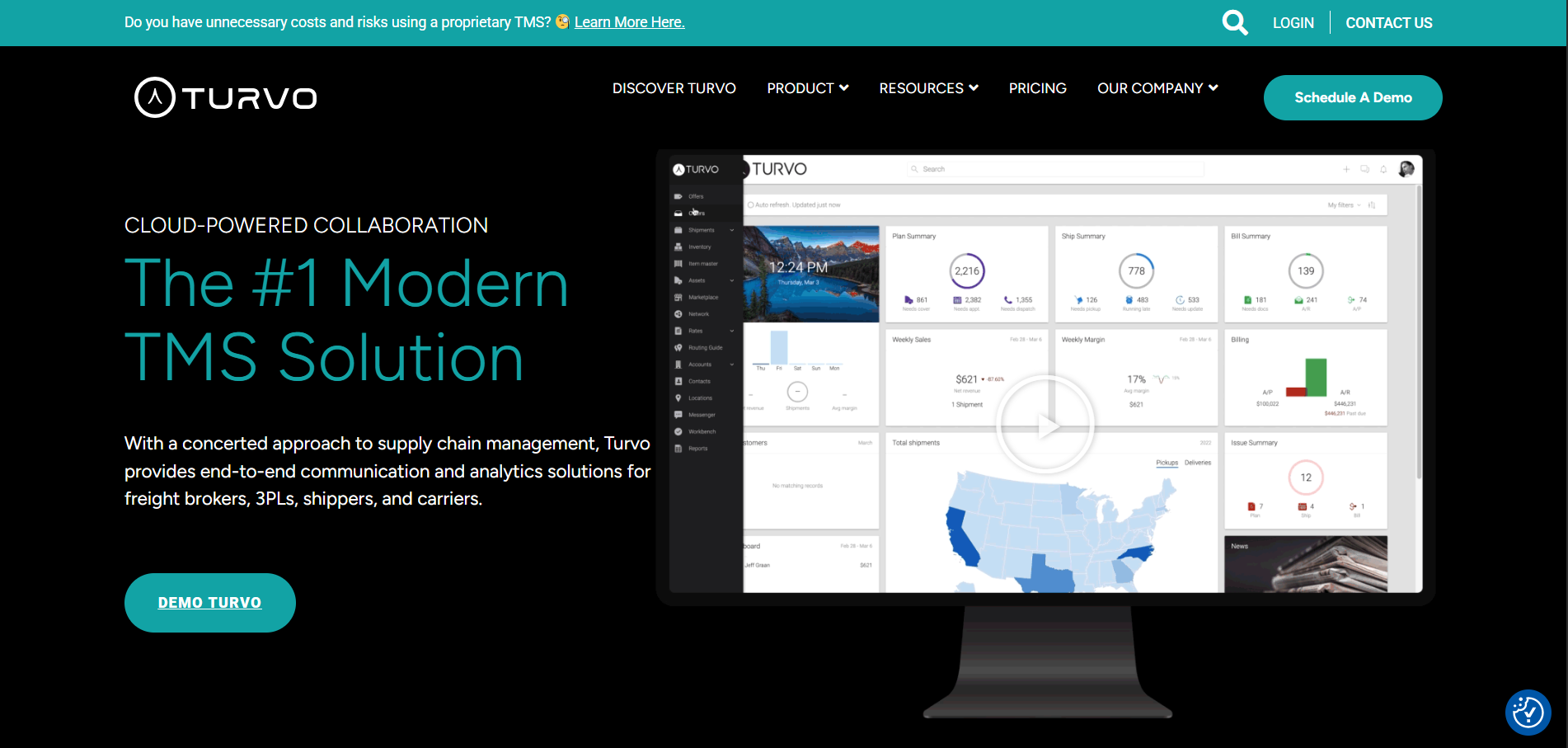
Turvo is a cloud-based transportation management system and collaboration platform built primarily for freight brokers and 3PLs that plan, execute, and settle freight.
What separates it from a conventional TMS is scope. A traditional system of record holds the shipment for the broker’s internal team. Turvo extends the relevant parts of that record to the shipper customer, the carrier, and other partners through its collaboration layer, so the people working a load can see and act on the same information.
For a newer brokerage, that means a professional customer experience without building one. For an established brokerage replacing a dated system, it means fewer status calls and less rekeying between tools.
Turvo’s Key Capabilities and Benefits
Turvo covers a wide product surface, including order planning, scheduling, analytics, and a driver app. Three capabilities drive the commercial outcome for a brokerage.
1. Unified Plan, Execute, and Settle Workflows, So You Add Freight Without Adding Headcount
Growth in a brokerage rarely breaks on sales. It breaks on the administrative work behind each load.
More volume means more check calls, more document chasing, more customer updates, and more places for a handoff to fail. Hiring against that curve is what flattens margin.
Turvo consolidates planning, execution, settlement workflows, messaging, and shipment data into one operating environment, which removes a share of the manual touches that scale with volume.
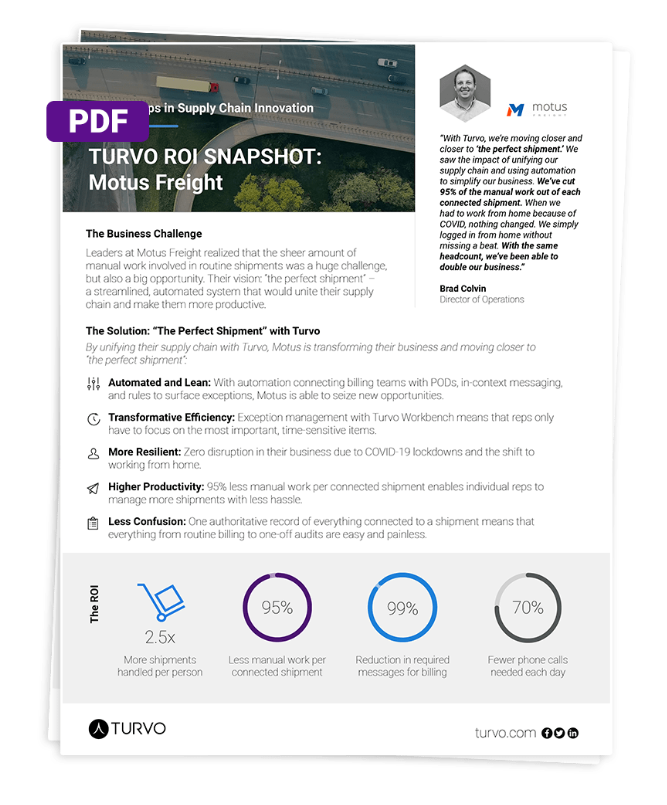
Turvo reports customers seeing 3x more revenue per broker, 5x more shipments per client, and 50% fewer manual updates.
Brad Colvin, Director of Operations at Motus Freight, put the operational result plainly: “We’ve cut 95% of the manual work out of each connected shipment. With the same headcount, we’ve been able to double our business.”
2. Collaboration Cloud, So Customers and Carriers Stop Calling for Status
Shipper retention is won on service, and service is mostly information.
When a customer has to email for a status, the brokerage absorbs that cost twice: once in the rep’s time, and again in how the account perceives the relationship.
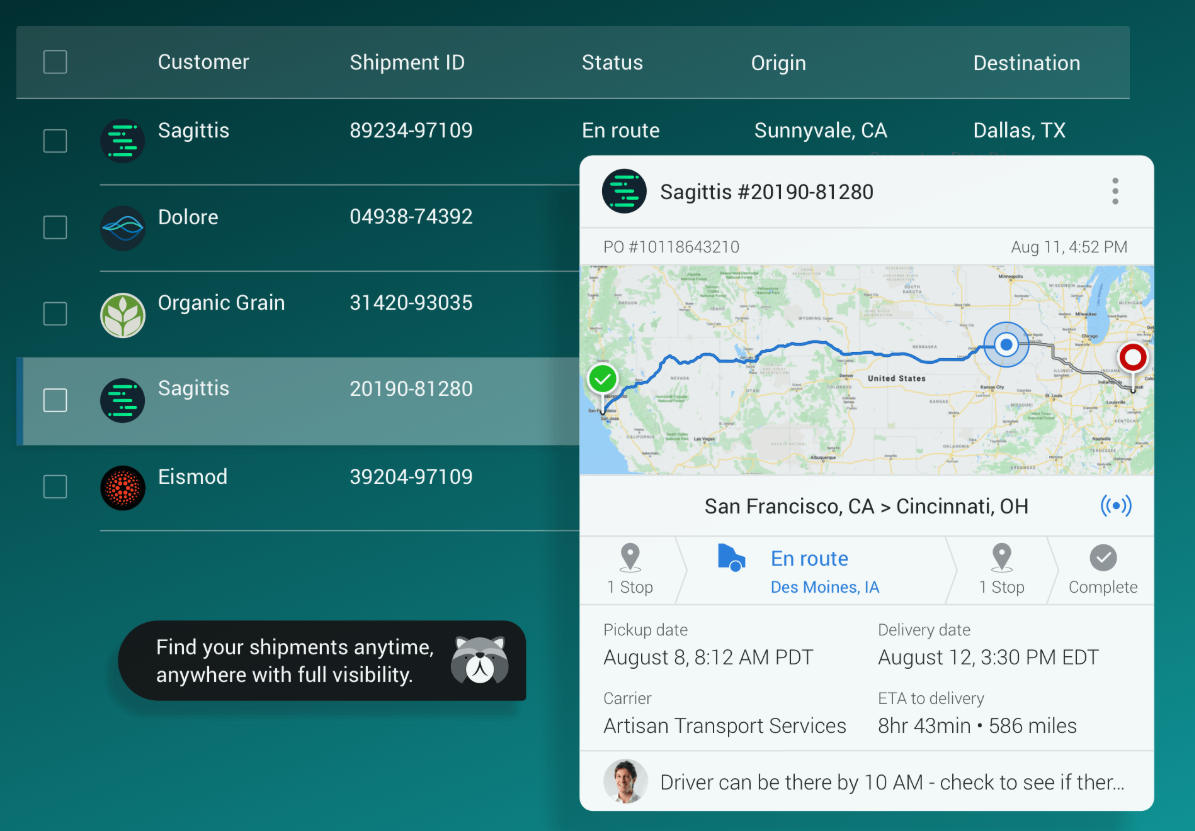
Turvo’s visibility and collaboration tools let brokers invite customers and carriers into the shipment itself, with contextual messaging, shared documents, and alerts attached to the load rather than scattered across inboxes. Turvo connects more than 36,000 organizations this way.

A brokerage that runs this way holds accounts when a competitor quotes the same lane five cents cheaper.
3. Integration Hub and Open APIs, So the TMS Never Becomes the Reason You Migrate Again
Most brokerages do not want one system. They want their freight management software to work with the load boards, tracking providers, carrier vetting tools, and accounting platform they already run.
A TMS that cannot connect to those tools becomes the reason for the next migration, which is an expensive way to discover an architecture problem.
Turvo’s Integration Hub supports pre-built integrations, a public API, webhooks, and data import tools, so the TMS can sit at the center of a stack the brokerage keeps changing.
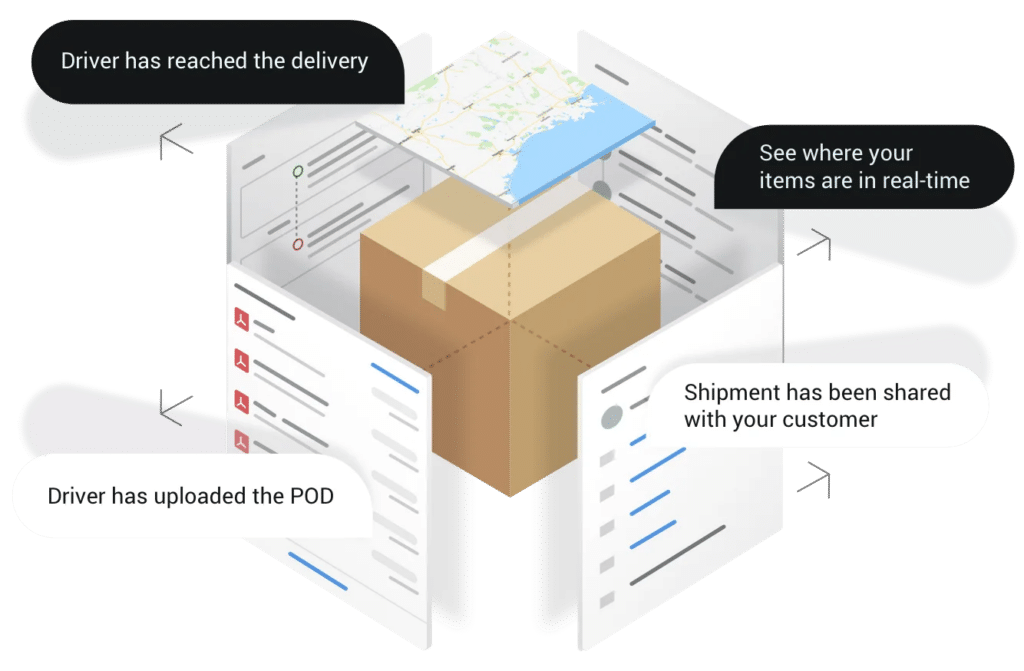
Driver-sourced status through the Turvo Driver App and telematics integrations feed that same record.

A growing brokerage can add a new capacity tool in year three without reopening the TMS decision.
Turvo Pricing
Turvo publishes its starting price, which is unusual in this category. Both plans include onboarding, training, and data migration.
| Plan | Focus | Price | Included services |
| Turvo TMS | Plan, execute, and settle freight | Starts at $5,000/month | Dedicated onboarding manager, virtual training, data migration, Support Center, Turvo Community and Academy |
| Turvo Enterprise | Collaboration and visibility across the supply chain | Available on request | Everything above, plus a dedicated customer success manager and quarterly business reviews |
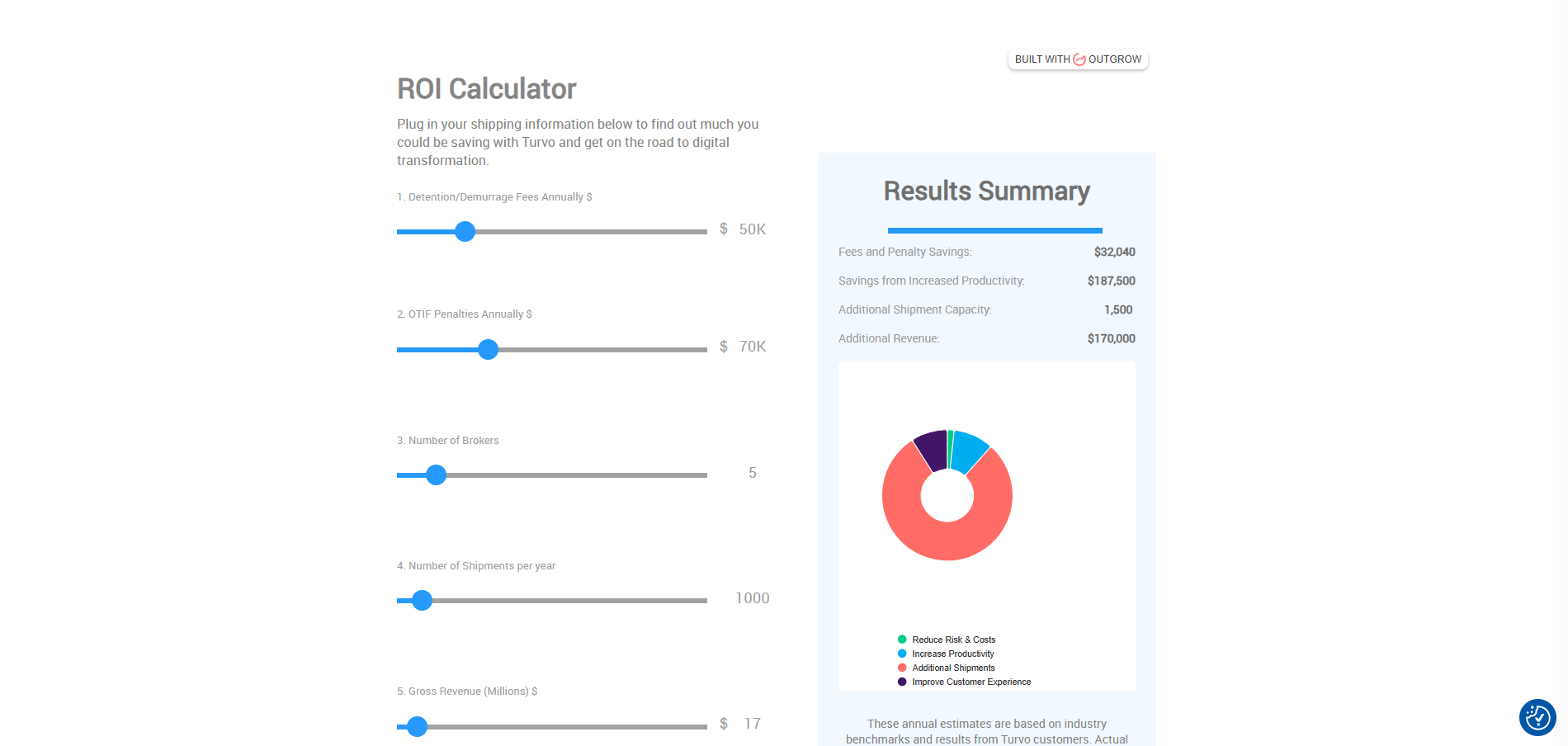
See current tiers on the Turvo pricing page, or model the operational impact first with the Turvo ROI calculator.
Where Turvo Shines
- Collaboration beyond the brokerage’s own users: Customers and carriers participate in the shipment workflow instead of receiving updates about it. That turns visibility into something the brokerage can sell.
- Scale economics: Consolidating planning, execution, and settlement removes manual touches that otherwise grow with volume, so a brokerage can add freight without adding operational headcount at the same rate.
- Visibility that ends in an action: Alerts, documents, and contextual messaging sit with the shipment, so teams manage by exception rather than checking every load.
- Integration flexibility: Public APIs, webhooks, and pre-built connectors let the TMS act as the operating core while specialized tools change around it.
- Usability that affects adoption: Brokers work in the system all day and customers see parts of it. Fewer workarounds means faster rep onboarding and a cleaner customer-facing experience.
- Support through the transition, not just the install: Implementation runs about eight weeks, in line with industry norms, and continues through onboarding, post-go-live hypercare, and training resources.
Turvo Customer Reviews
Kareena B., a Logistics Coordinator, wrote on G2 that Turvo saves time on documents like BOLs and rate confirmations, and called the tracking the best she has used, with real-time driver location on a map.
Brian Hastings, Co-Founder at Veritas Logistics, said the decision was simple because it gave operators a way to digitize operations while customers got faster shipment execution.
Who Turvo Is Best For
- Growing brokerages replacing a dated TMS: Teams that need better integrations, a stronger customer portal, and workflows that will not cap growth.
- New and agent-model brokerages: Operators building an independent stack who want structured workflows and a credible customer experience from day one.
- 3PLs running brokerage-style operations: Teams managing transportation for customers who need execution, visibility, and analytics connected.
- Brokerages committed to best-of-breed tools: Operations that want the TMS as the system of record without giving up specialized load board, tracking, or accounting software.
See how the workflows hold up against your own lanes and customers. Book a Demo with Turvo.
2. McLeod: Best for Asset-Heavy Operations Needing Accounting Depth
McLeod is mature freight management software for brokerage and 3PL operations. It fits one profile best: a business that brokers freight, runs its own trucks, and needs both sides settling into the same books.
Key Capabilities and Benefits
- Close the month inside the TMS: Integrated accounting captures general ledger activity with receivables, payables, and revenue allocation.
- Model LTL properly: PowerBroker LTL automates quoting, rating with accessorials, orders, and carrier tenders as an add-on.
- Keep asset and brokered freight on one ledger: FlowLogix moves data between LoadMaster and PowerBroker so owned-truck and brokered loads post to the same books.
Pricing
| Plan | Price | Notes |
| PowerBroker | Not published | Quote-based, with modules priced separately |
McLeod publishes no pricing. Scope the modules carefully, since LTL, analytics, and document management are add-ons.
Where McLeod Shines
- Financial depth: Few brokerage platforms carry a real general ledger, which removes a reconciliation problem for hybrid operations.
- Asset and brokerage in one environment: The LoadMaster pairing manages owned-truck and brokered loads with shared profitability reporting.
- LTL and terminal modeling: Consolidation planning and LTL freight billing are modeled natively, which truckload-first platforms generally do not do.
Where McLeod Falls Short
- More system than a pure-play broker needs: A non-asset brokerage pays for configuration and administration it never uses.
- Interface and rollout: Independent 2026 reviews describe it as powerful but dated next to cloud-native platforms, with implementation measured in months.
Customer Reviews
Nicole S., a Special Projects and Software Integrations Manager, wrote, “Our company has a great support and sales team assigned to our account. They are incredibly knowledgeable and responsive.”
Ryleigh R., a Logistics Consultant, wrote, “Very easy to use once you get the hang of it. Works very well to integrate other customers’ TMS systems.”
Who McLeod Is Best For
- Hybrid asset and brokerage businesses: Operations running trucks and brokered freight in one company.
- Finance-led buyers: Teams that want the general ledger inside the transportation system.
- LTL-heavy operations: Businesses needing terminal, consolidation, and LTL billing modeled natively.
3. Infios TMS (Formerly MercuryGate): Best for Enterprise Multimodal Transportation Networks
Infios Transportation Management (TM), formerly MercuryGate TMS, is an enterprise freight management system moving freight across ground, ocean, air, rail, and parcel. Körber and KKR acquired MercuryGate in October 2024 and rebranded the parent as Infios, so buyers will see both names. It suits organizations where transportation spend is large enough that optimization produces real savings.
Key Capabilities and Benefits
- Cut cost through planning, not negotiation: Optimization across shipments, assets, and procurement finds savings in how freight is built and routed.
- Manage every mode in one rate engine: FTL, LTL, parcel, ocean, and air quoting sit in a single interface.
- Control freight spend accuracy: Freight audit and payment catch billing variance at scale.
Pricing
| Plan | Price | Notes |
| Infios TMS (MercuryGate) | Not published | Modular subscription, quoted by users or transactions |
Capterra lists the starting price as “contact vendor” with no free trial.
Where Infios TMS Shines
- Genuine multimodal breadth: Few platforms model ocean, air, rail, and parcel alongside truckload with equal seriousness.
- Optimization and freight audit: Strong tendering, settlement, and freight-spend reconciliation at enterprise volume.
- Enterprise and cross-border footprint: Built for organizations running freight across regions, business units, and international lanes.
Where Infios TMS Falls Short
- Implementation scope: Technology Evaluation Centers reports critical reviews concentrating on implementation difficulty, including interface complexity and legacy integration.
- Poor fit below enterprise: A smaller brokerage cannot justify the configuration burden or the quote-only pricing.
Customer Reviews
A Supply Chain reviewer in the transportation industry said: “Infios TMS has been a great fit for our 3PL operation.”
A Supply Chain Manager in the energy and utilities industry said: “The project team has been accommodating and flexible with our requirements. They have helped make the transition easier.”
Who Infios TMS Is Best For
- Enterprise shippers and large 3PLs: Organizations with significant spend and multi-mode requirements.
- Optimization-driven teams: Businesses where planning improvements produce measurable savings.
- Multi-region operations: Companies coordinating transportation across business units.
Pro Tip: Ask whether a product was designed for shippers or brokers before you look at a single screen. Both use “customer” to mean different things, and the data model follows from that.
How We Ranked the Best Freight Management Software
We evaluated these freight management solutions on the factors that matter most when selecting and scaling transportation technology.
- Ideal customer fit: How well the platform aligns with different operating models, including brokerages, 3PLs, asset-heavy businesses, enterprise shippers, and global forwarders.
- Deployment model: The architecture, implementation approach, and level of configuration required to adopt and scale the software.
- Ecosystem and connectivity: The breadth and flexibility of connections to load boards, accounting systems, tracking providers, carrier tools, ERPs, APIs, and EDI.
- Automation: How effectively the software reduces repetitive work across order entry, carrier communication, tracking, documents, billing, and alerts.
- Workflow coverage: How well the platform supports quoting, load creation, carrier sourcing, dispatch, tracking, invoicing, settlement, and daily execution.
- Customer-facing capabilities: The quality of portals, shipment visibility, communication, document sharing, and partner collaboration.
- Scalability and operational fit: How well the platform supports increasing volume, users, locations, and integrations as the business grows.
How to Choose a Freight Management Software
Freight software demos all look similar, and feature lists converge. The differences that matter show up in four checks.
1. Test the Workflows That Consume the Most Time
Do not demo the happy path. Ask each vendor to run the tasks that generate the most rework: creating a load, covering a lane that fell through, collecting a late POD, approving detention, and pushing a delivered shipment to invoicing.
Count the manual steps that remain and the moments a user has to leave the system. That count predicts what your team’s day looks like in month six better than any feature matrix.
Turvo consolidates shipment context, documents, messaging, and status so those workflows stay in one place. Our guide to modern TMS UX and broker productivity covers what to watch during a demo.
Want to see your own workflow mapped rather than a generic demo script? Schedule a Turvo demo.
2. Check How the Platform Fits the Stack You Already Have
List every system that must exchange data with the TMS: load boards, accounting, tracking providers, carrier vetting and insurance tools, telematics, and payment platforms.
Then go past the word “integration.” Ask what data moves, whether it moves both ways, what needs custom development, and what adding a new tool in 2028 would involve.
This is where brokerages most often buy their next migration by accident. Turvo’s Integration Hub supports pre-built connectors, a public API, webhooks, and data import tools so the TMS stays the system of record while the tools around it change. The risks of running a proprietary TMS white paper covers the architecture case in more detail.
3. Separate the Operations Decision From the Accounting Decision
A TMS records what the money should be. It rarely moves the money or closes the books.
Decide early whether you want accounting inside the TMS, as PowerBroker offers, or a general ledger plus a payments layer beside a best-of-breed TMS. Both work. Choosing by accident does not.
Ask each vendor exactly which financial steps happen in their system and which require another tool. The answer changes your total cost more than the subscription line does.
4. Evaluate Migration, Onboarding, and What Happens After Go-Live
For an established brokerage, switching affects live shipments, customer and carrier records, integrations, user roles, and finance processes.
Ask what data migrates, who owns each step, how workflows get mapped, and what support continues after launch. Compare that alongside the subscription price, because a cheap platform with a rough cutover is not cheap.
Turvo uses Turvo Data Import (TDI) to move customer accounts, carrier accounts, historical shipments, and shipments already in flight, with implementation running about eight weeks. Support continues through onboarding, hypercare, and training resources. Top questions for selecting a TMS is a useful checklist to bring to vendor calls.
Compare transition requirements before you compare price. Talk to the Turvo team.
Run Every Shipment on One Platform With Turvo
Most of these platforms will move your freight. Fewer will keep your customers, carriers, and internal teams working from the same information as volume grows.
Turvo is built for that second job. Freight brokers and 3PLs get a TMS that plans, executes, and settles freight, plus a collaboration layer that brings everyone touching the load into the same record, and an open architecture that keeps the specialized tools the business already relies on.
If you run your own trucks, ship your own product, or operate at genuine enterprise scale, one of the other three will fit better.
See why brokerages choose Turvo, or compare the broker-specific shortlist in our guide to the best freight broker software.
FAQs
1. Is Freight Management Software the Same as a TMS?
No. A transportation management system (TMS) plans, executes, and settles shipments. Freight management software, sometimes called a freight management system, is the wider category, covering back-office payments, visibility tools, customs systems, and load boards.
2. How Much Does Freight Management Software Cost?
It varies widely. Turvo publishes a starting price of $5,000 a month, while McLeod and Infios TMS, all price by quote. Factor in implementation and integration work on top of the subscription.
3. Do Freight Brokers Need Separate Accounting Software?
Usually yes. Most brokerages pair a TMS with a general ledger such as QuickBooks or NetSuite. McLeod PowerBroker is the main exception, since its general ledger sits inside the TMS.
4. How Long Does Freight Management Software Take to Implement?
It depends on scope. Turvo runs about eight weeks, in line with industry norms. Heavily configured enterprise platforms often run considerably longer.
5. Can One Platform Handle Both Domestic Truckload and International Freight?
Rarely well. The documents, regulations, and workflows differ. Most operations doing both keep a domestic TMS as the system of record and connect a separate forwarding or customs system to it.