


Key Takeaways
- Turvo stands out for 3PLs that want stock position, freight execution, and partner communication in a single cloud platform, with customers and carriers working inside the same record.
- Infios Transportation Management (formerly MercuryGate) suits providers sourcing warehouse and transportation software from one vendor, since both products sit in the Infios portfolio.
- McLeod Software fits providers that need a say in where the software physically runs, supporting on-premises, customer-managed cloud, and McLeod-managed hosting.
- The rankings look past feature totals, weighing each platform on cloud architecture, how warehouse and freight data travel together, release cadence, and multi-client scale.
Your warehouse team and your planners can look at the same order and see different numbers. Usually that is a file that has not run yet.
Cloud-based 3PL software closes that delay. The 2027 Third-Party Logistics Study found 93% of shippers weigh a provider’s AI capability when awarding contracts, and 54% of respondents named legacy systems and integration complexity as the obstacle to delivering it.
Three platforms answer that differently: Turvo ties inventory position to freight execution, Infios Transportation Management sells the warehouse and transportation sides together, and McLeod lets you decide where the software runs.
What Is Third-Party Logistics (3PL) Software?
3PL software runs the logistics work a provider performs for its clients. It covers two jobs that have to stay in sync: what sits in the warehouse, and what moves on the road.
Transportation management handles order planning, carrier sourcing, tendering, tracking, documents, and settlement. Warehouse management handles receiving, putaway, picking, packing, and stock counts. Many providers run a dedicated system for each and connect them, because few platforms do both to full depth.
Cloud-based 3PL software runs on cloud infrastructure and is accessed over a network rather than relying solely on locally installed systems. Depending on the vendor, it may be vendor-hosted SaaS, deployed in a customer-managed cloud environment, or offered through managed cloud hosting.
What that buys a provider:
- Access from every site, so a warehouse supervisor and a transportation planner see the same record
- Updates without a project, because new releases arrive centrally rather than through an upgrade cycle
- API connections to client systems, instead of scheduled file transfers and rekeying
- Capacity that flexes with volume, which matters when a client’s peak season doubles your order count
- Lower entry cost, since subscription pricing replaces hardware and licenses
Our guide to 3PL solutions covers how these layers fit together, and what to look for in a 3PL WMS goes deeper on the warehouse side.
1. Turvo: Best for 3PLs Looking to Collaborate With Shippers, Carriers, and Customers
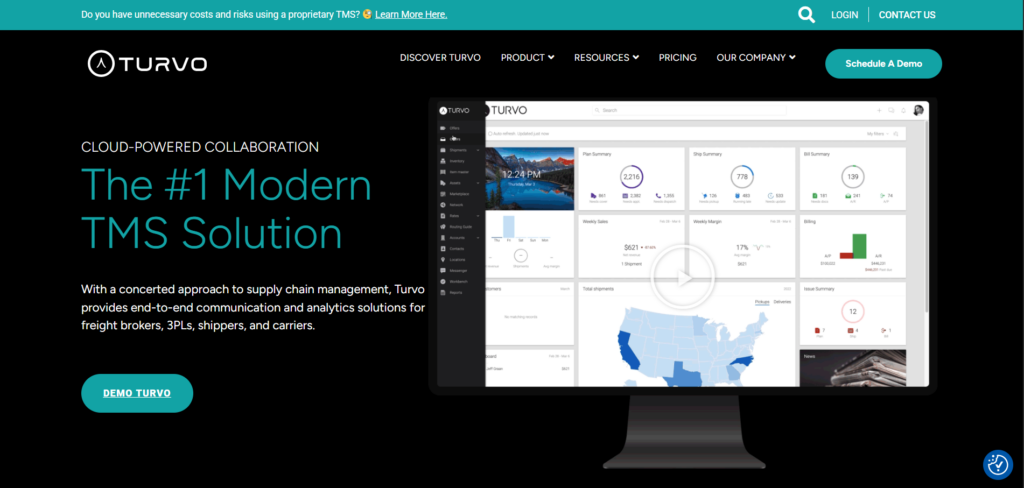
Turvo is a cloud transportation management system and collaboration platform for 3PLs, freight brokers, and managed transportation providers.
Its distinguishing move is who gets access. Alongside your own team, Turvo brings shippers and carriers into the same shipment record, so the people who need an answer can look it up rather than request it.
For warehouse-adjacent operations, that access extends to stock. Inventory visibility, dock appointments, and freight status sit in one environment instead of three.
Key Capabilities and Benefits
1. Match Freight Plans to What Is Actually on the Shelf
Planning a shipment against stale stock counts produces short shipments and reschedules. Most providers discover the gap after the truck is booked.
Turvo’s inventory and warehouse visibility shows stock by facility, lot, and SKU, with expiring-lot alerts and search across the network. Because it sits beside order to shipment planning, teams can plan against stock status rather than against a spreadsheet exported that morning.
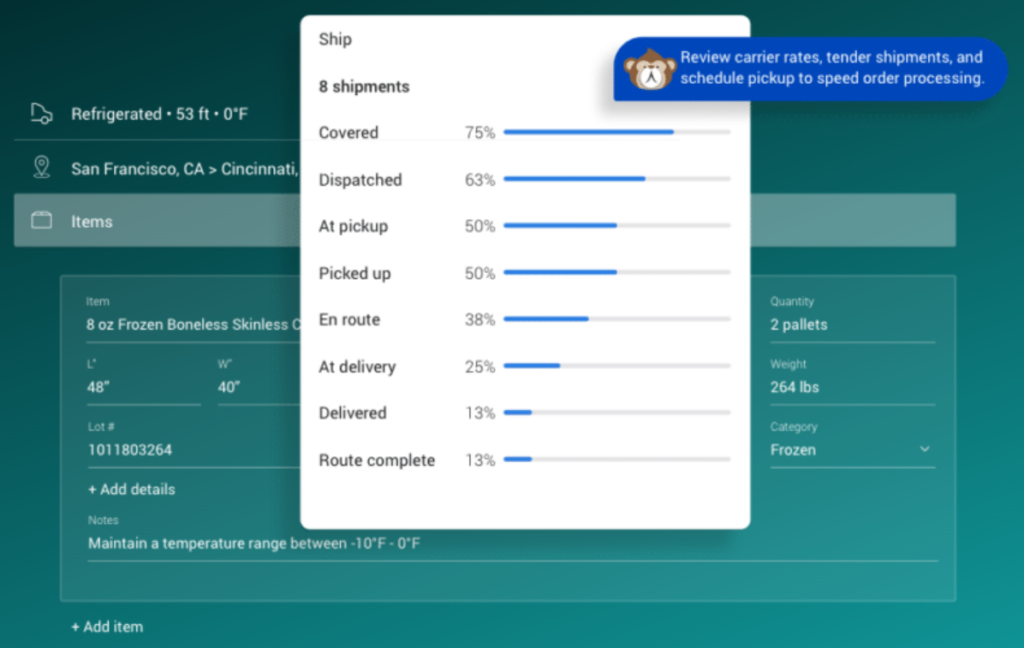
Cross-tenant sharing extends the same view to suppliers and resellers, so a client can check availability without opening a ticket with your team.
Pro tip: Turvo provides inventory and warehouse visibility, not a full 3PL warehouse management system. If you need receiving, putaway, and pick-pack execution, plan to run a WMS alongside it and connect the two.
The payoff is fewer surprises at the dock and fewer loads rebuilt after the fact.
2. Hand Dock Scheduling Back to Carriers
Warehouse appointment scheduling software replaces the phone-and-email booking that ties up staff and still produces trucks arriving in the wrong window.
Turvo scheduling connects appointments to the order, shipment, customer, and carrier record, with self-service booking through shareable links and custom appointment rules. Carriers pick a slot. Arrival and departure updates flow back automatically.
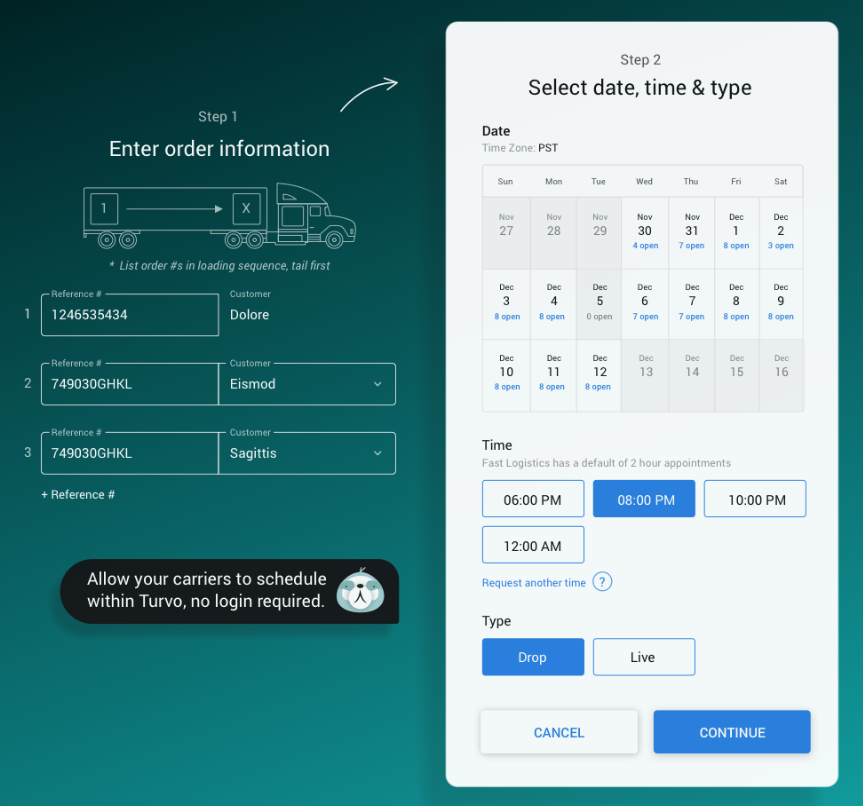
When a plan shifts, the parties affected see it in the same place they booked, which keeps a delay from turning into a missed dock window.
3. Collect Proof of Delivery Where It Is Created
A delivered load is not finished until the paperwork lands. Chasing a bill of lading or digital proof of delivery days later is how settlement stalls and cash sits uncollected.
The Turvo Driver App lets drivers capture and share documents, post status, and message your team from the cab, with location data from GPS and connected telematics. Those documents attach to the shipment record as they are created.
Pro tip: Ask any vendor what percentage of proofs of delivery arrive within 24 hours of delivery for a comparable customer. It is a sharper question than asking whether document capture exists.
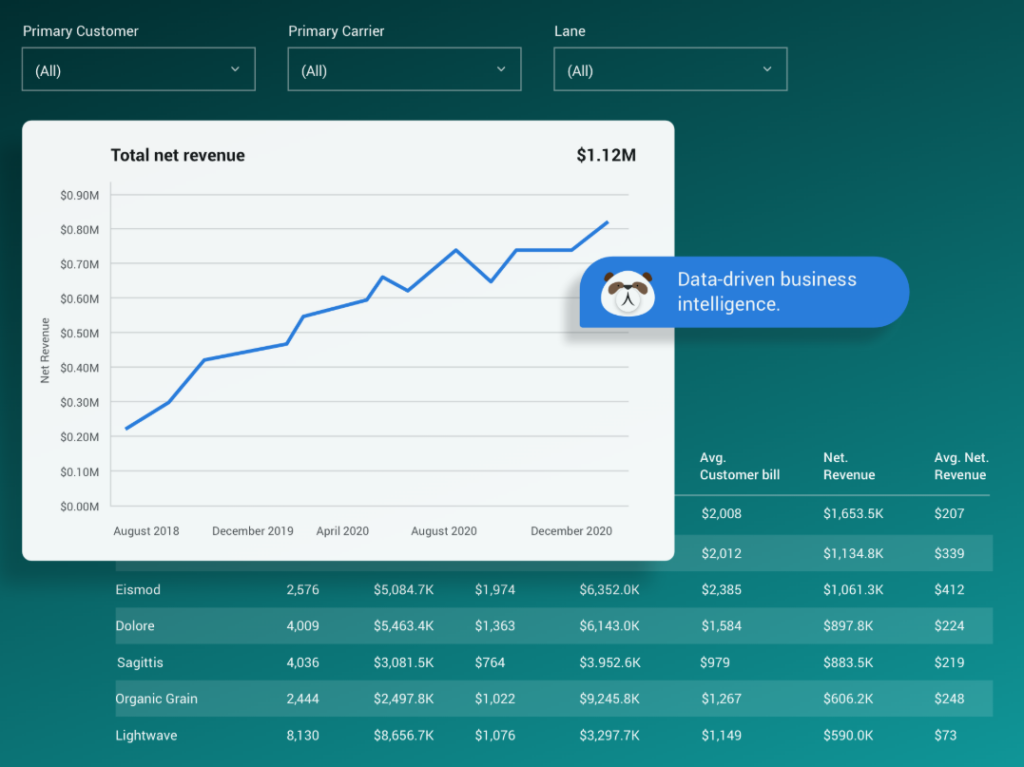
Turvo Analytics then reports on carrier, lane, customer, and financial performance, so you can see which accounts and lanes carry the delays.
Turvo Pricing
Turvo offers transparent pricing, with its TMS plan starting at $5,000 per month and Enterprise pricing available upon request. Both plans include onboarding and data migration.
Where Turvo Shines
- One record shared across company lines: Shippers and carriers hold accounts in the same environment your staff uses, which removes the status call and the forwarded email that normally sit between a question and its answer.
- An interface staff actually adopts: Warehouse supervisors, planners, and your clients all touch the same software, so usability drives training time, workarounds, and how your operation looks to the people buying from you.
- Volume grows faster than headcount: Cutting repeat data entry, chased documents, and duplicated updates lets the same team absorb more orders without matching growth in back-office cost.
- Tracking tied to resolution: Position data sits with documents, alerts, and messaging, so an exception gets resolved on the screen where it surfaced.
Turvo Customer Reviews
Sudarsan Thattai, Chief Information Officer at Lineage Logistics, described the value in experience terms, saying it is “about the digitization of our customer experience, self-serve, and differentiating” so customers can find information themselves.
Nick Reasoner, CEO at Transloop, framed the switch against the status quo, saying “90% of logistics companies are operating on inefficient tools that create manual processes.”
Who Turvo Is Best For
- Providers coordinating warehouse and freight together: Teams where a stock position drives a shipment decision the same day.
- 3PLs whose clients expect self-service: Operations defending accounts against providers with better portals.
- Managed transportation providers: Teams running freight programs that span several client systems and carriers.
- Growing providers adding clients faster than staff: Operations limited by coordinator hours rather than carrier capacity.
- Teams keeping specialist tools: Providers that want the TMS as the operating core while retaining a separate WMS, accounting platform, and carrier tools.
Walk through your own workflows with the team. Book a demo now.
2. Infios Transportation Management: Best for Warehouse and Transportation Software From One Vendor
Infios Transportation Management connects multimodal freight planning and execution to the warehouse software sold alongside it, giving providers one vendor across both halves of the operation.
That single-supplier path is the argument here. Buying the WMS and TMS from the same company removes a second vendor relationship and can reduce the cross-vendor integration and support overhead.
The product sold as MercuryGate until Körber Supply Chain Software bought it in 2024. It took the Infios name after Körber rebranded in 2025, so earlier comparisons still say MercuryGate.
Key Capabilities and Benefits
- Buy warehouse and transportation software together: Both sit in the Infios portfolio, which simplifies contracting and support escalation for providers that run warehousing and freight.
- Plan freight across every mode: Coverage spans ocean, air, rail, parcel, and over-the-road, useful when one client program crosses several.
- Cut cost through optimization: The multimodal optimization engine weighs cost, service, and capacity, and reviewers return to it as the platform’s strongest piece.
- Reconcile freight charges: Freight audit and pay connects execution to financial settlement.
Pricing
Infios does not publicly disclose its pricing. Custom quotes depend on the selected modules, freight volume, and configuration requirements.
Where Infios Transportation Management Shines
- Portfolio breadth: Warehouse and transportation software under one vendor reduces integration and contracting overhead.
- Modal coverage: A wider range of transportation modes than either alternative here.
- Configurability: Larger providers can shape the system around workflows they already run.
Where Infios Transportation Management Falls Short
- Configuration demands technical staff: Reviewers describe implementation and customization work that assumes engineering resources on your side.
- Older interface and learning curve: New users take longer to become productive than on a lighter platform.
- Support consistency: Responsiveness is the complaint that recurs most across review sites.
Customer Reviews
Joshua G., a reviewer in transportation and trucking at a company of 51 to 200 employees, highlighted scale and connectivity on Software Advice, noting it is “able to handle very large Fleets. Integration with other corporate systems.”
Jordan M., reviewing from a transportation company of 1,001 to 5,000 employees on the same platform, flagged a deployment trade-off, writing that it is “very hard to find standardization if you want to manage on premises.”
Who Infios Transportation Management Is Best For
- Providers consolidating vendors: Teams that want warehouse and transportation software on one paper trail.
- Multimodal operations: 3PLs managing ocean, air, rail, and parcel beside truckload.
- Organizations with technical staff: Teams that can resource configuration and integration work.
3. McLeod Software: Best for Providers That Want Control Over Where the Software Runs
McLeod Software connects brokerage execution, driver management, and accounting in one system that you can run on your own hardware or let the vendor host.
The company has supplied transportation systems since 1985. PowerBroker serves brokerage and 3PL operations, LoadMaster serves asset-based carriers, and the two share a code lineage.
On deployment, McLeod is the outlier in this comparison. Customers run it on-premise, in a cloud account they control, or on McLeod-managed hosting. For providers with data residency obligations, an existing data center, or clients who ask where records physically live, that choice has value the pure-SaaS platforms cannot offer.
The trade-off is the one cloud buyers already know. Self-hosting means you own the servers, the upgrades, and the patching.
Key Capabilities and Benefits
- Choose your deployment: On-premise, customer-managed cloud, or vendor hosting, decided by your requirements rather than the vendor’s model.
- Run assets and brokered freight together: Shared lineage between PowerBroker and LoadMaster supports providers operating trucks beside a brokerage.
- Keep accounting in the system: Balance sheet, income, and cash flow reporting live in the TMS itself, not in a connected finance tool.
- Gate invoices on documents: Rendition Billing holds an invoice until document rules are satisfied.
Pricing
McLeod does not publicly disclose pricing for its software solutions. Custom quotes depend on the products selected, user count, and deployment requirements.
Where McLeod Shines
- Deployment flexibility: The only platform here that lets you decide where the software and data sit.
- Financial depth: Built-in general ledger accounting removes a system boundary between operations and finance.
Where McLeod Falls Short
- Self-hosting carries real cost: Running it yourself means absorbing infrastructure, upgrades, and security work that a cloud vendor would otherwise handle.
- Interface age and training load: A dated interface and a steep learning curve come up consistently in reviews.
- Longer deployments: Complex implementations can require a longer runway, particularly when they involve multiple products, integrations, data migration, and customer-managed infrastructure.
Customer Reviews
A verified LoadMaster reviewer on G2 praised the single-system approach, writing that it covers “everything you need to be successful in the transportation industry in one location.”
Maria A., Logistics Coordinator, said, “You can keep your loads organized on the boards and keep them on track. You can also integrate it with any tracking tool.”
Who McLeod Is Best For
- Providers with hosting requirements: Teams facing data residency rules or client questions about where records live.
- Asset-based 3PLs: Providers running owned trucks beside brokered freight.
- Finance-led operations: Teams wanting general ledger accounting inside the TMS.
How We Ranked the Best Cloud-Based 3PL Software
We evaluated each platform based on how well it supports 3PL operations across warehouse-adjacent workflows, transportation, client access, integrations, and cloud deployment.
- Cloud architecture: Whether the platform is cloud-native, vendor-hosted, customer-managed, or available through multiple deployment models.
- Warehouse and transportation connectivity: How effectively inventory, orders, appointments, freight activity, and delivery information move between systems.
- Integration flexibility: Support for APIs, EDI, webhooks, and connections with WMS, ERP, accounting, tracking, and other logistics tools.
- Multi-client scalability: Ability to support multiple customers, facilities, users, and changing order volumes without creating more manual work.
- Customer and partner access: How easily shippers, carriers, and other partners can access relevant information and participate in workflows.
- Release and maintenance model: How updates, fixes, configurations, and integrations are managed as the platform evolves.
- Operational scalability: How well the software performs as transaction volume increases during customer growth and peak periods.
How to Choose a Cloud-Based 3PL Software
The word cloud covers several architectures, and the differences show up in your upgrade cycle and your integration bill. Four checks separate them.
1. Confirm It Is Cloud-Native, Not Old Software Hosted Remotely
Plenty of platforms marketed as cloud are legacy applications running on someone else’s servers. Browser access does not make an architecture modern.
Ask when the core product was built, whether every customer runs the same version, and whether the vendor can deploy a fix without scheduling downtime with you. Multi-tenant platforms answer those easily. Hosted legacy builds usually cannot.
2. Ask How Releases Reach You and How Often
A cloud vendor shipping improvements continuously is only an advantage if those releases do not break your configuration.
Ask how often releases ship, whether you get a sandbox beforehand, how custom configuration is tested against a new version, and who pays if an integration breaks during one.
3. Check How Warehouse and Freight Data Move Together
This is where most cloud 3PL evaluations go wrong. A platform can be excellent at freight and still leave your warehouse team rekeying.
Map the handoffs: stock availability into shipment planning, dock appointments into carrier communication, proof of delivery into billing. Then ask whether each moves through an API in real time, a scheduled file, or a person.
4. Test It at Your Peak, Not Your Average
Cloud platforms scale on paper. Your clients’ peak season is where that claim gets tested.
Ask for performance data at volumes matching your busiest month, not your typical one. Find out how pricing responds when order counts spike, whether user seats can flex temporarily, and what happened to existing customers during last year’s peak.
Get End-to-End Visibility Across the Supply Chain With Turvo
Shippers are outsourcing more of their transportation and warehousing, and they are weighing provider technology when deciding who keeps the work. Software that hides your operation behind a phone call makes that a harder case to win.
Turvo connects inventory status, freight execution, dock scheduling, and partner communication in one cloud platform, with collaboration and visibility extended to the customers and carriers in each shipment. Open APIs keep your WMS, ERP, and accounting systems connected as the operation grows.
If your clients are asking harder questions about your technology, request a Turvo demo and see what they would be able to see.
FAQs
1. What Does Cloud-Based Actually Mean for 3PL Software?
It means the vendor hosts and maintains the software and you reach it through a browser. You avoid buying servers, running upgrades, and patching, and the vendor ships new releases centrally.
2. Is Cloud-Based 3PL Software Cheaper Than On-Premise?
Usually upfront, not always overall. Subscription pricing removes hardware and license costs, but multi-year subscription totals can exceed a self-hosted build. Compare over five years, including the staff time self-hosting requires.
3. Can Cloud 3PL Software Connect to My Existing WMS?
Yes. Most cloud platforms connect to warehouse systems through APIs, webhooks, or EDI. Confirm which specific WMS connections are pre-built versus custom work before signing.
4. Is Cloud 3PL Software Secure Enough for Client Data?
Generally yes, and often more secure than self-hosting. Ask for SOC 2 reporting, data residency details, encryption standards, and the vendor’s breach notification terms, then match those against what your client contracts require.
5. Does Cloud 3PL Software Handle Ecommerce Order Volume?
Yes, though capability varies widely. Providers with parcel-heavy ecommerce clients should test rate shopping, label generation, and order throughput at peak volume rather than assuming the platform scales.